Budget setup with actual-vs-planned progress
What does this feature do?
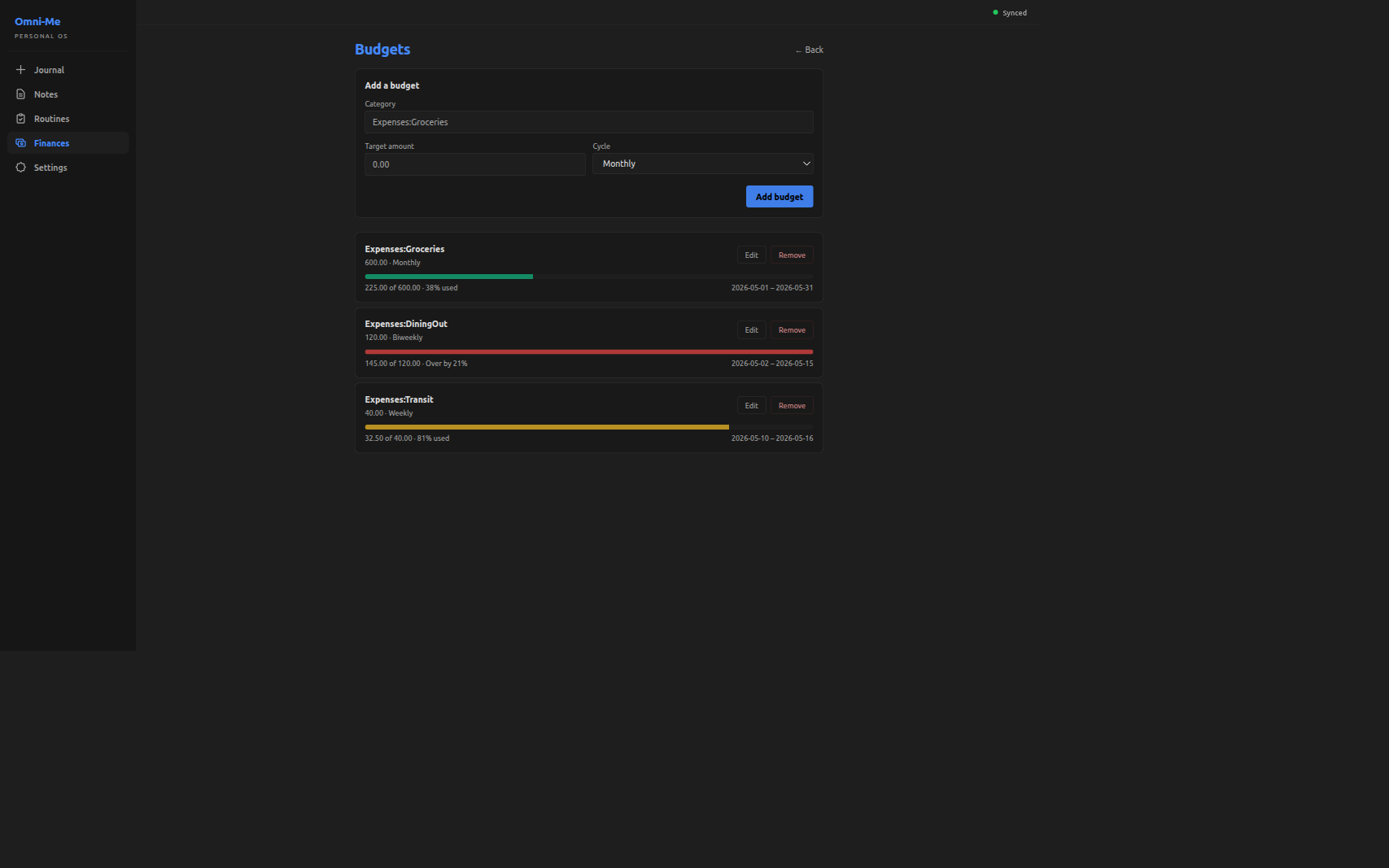
The Budgets screen, under the Finances tab, lets the user set a spending target per expense category (Expenses:Groceries, Expenses:Transit, and so on) with a cycle of Weekly, Biweekly, or Monthly. Each saved budget renders a row showing the target alongside actual spending in the current cycle — a colored progress bar (green under 75%, amber up to 100%, red over), an "X of Y · N% used" readout, and the cycle's date window. Actuals are read live from the journal each time the screen loads; weekly and monthly cycles are calendar-anchored (Sunday–Saturday and first-to-last of the month) while biweekly is a rolling fourteen-day window ending today.
Why was it added now?
The dashboard widgets — net worth, recurring obligations, can-I-afford — answer "where do I stand right now?" That's the descriptive axis. The prescriptive one was unanswered: am I on track for what I planned to spend? The journal already carries the data — every expense posting has a category and a date — but until the user supplies a target per category, there's nothing to compare actuals against. Budgets adds the target side: a form for per-category targets, plus per-cycle window math on top of the aggregation pipeline the dashboard already used.
What's in scope (and what's not)?
In: add/edit/remove a budget per category with a Weekly/Biweekly/Monthly cycle; a live progress bar per saved budget.
Not in:
- A picker affordance for arbitrary day counts — the schema and window math both accept
custom:N, but the dropdown holds the line at the three named cadences. - Carry-forward or envelope-style budgeting — each cycle stands alone; leftover headroom doesn't roll forward, and a previous overrun doesn't shrink the next target.
How do we know it works?
cargo test -p omni-me-core --lib budget:: -- --skip balance_check
running 19 tests
test budget::tests::biweekly_is_fourteen_days ... ok
test budget::tests::budget_progress_skips_unparseable_period ... ok
test budget::tests::budget_progress_handles_zero_target ... ok
test budget::tests::budget_progress_flags_over_budget ... ok
test budget::tests::budget_progress_ignores_other_categories ... ok
test budget::tests::budget_progress_sums_in_window_postings ... ok
test budget::tests::collect_expense_parsed_drops_non_expense_legs ... ok
test budget::tests::collect_expense_parsed_drops_unconvertible_foreign_leg ... ok
test budget::tests::collect_expense_parsed_skips_malformed_rows ... ok
test budget::tests::collect_expense_parsed_passes_through_base_currency_legs ... ok
test budget::tests::custom_n_parses_positive_integer ... ok
test budget::tests::custom_non_numeric_is_rejected ... ok
test budget::tests::custom_zero_is_rejected ... ok
test budget::tests::monthly_is_thirty_days ... ok
test budget::tests::unknown_period_is_rejected ... ok
test budget::tests::weekly_is_seven_days ... ok
test budget::tests::window_for_custom_n_spans_n_days ... ok
test budget::tests::window_includes_as_of ... ok
test budget::tests::window_returns_none_for_unknown_period ... ok

test result: ok. 19 passed; 0 failed; 0 ignored; 0 measured; 350 filtered out; finished in 0.00s
Four buckets. Cadence parsing (7 tests): each named cadence resolves to its day count, custom:N parses positive integers with zero and non-numeric forms rejected, anything else returns None. Window resolution (3 tests): the window includes as_of, custom:N spans exactly N days, an unknown cadence yields no window. Aggregator (5 tests): actuals sum only postings inside the window matching the budget's category, the over-budget flag fires when actuals exceed target, and budgets with unparseable cadences are skipped silently. Posting flatten (4 tests): non-expense legs drop, foreign legs without a Prices entry drop, base-currency legs pass through, malformed rows skip.
core/src/budget.rs:27 at baf3fd4
pub fn period_to_days(period: &str) -> Option<u32> {period_to_days — the cadence parser.
custom:Nis the forward-compat hook the dropdown doesn't yet expose; the test bucket above covers its positive-integer / zero / non-numeric branches.
core/src/budget.rs:266 at baf3fd4
pub fn compute_budget_progress(compute_budget_progress — the aggregator entry point. Takes the budget set, the flattened postings, and an
as_ofdate; per budget, resolves the current window viacurrent_period_window, sums matching postings, and returns theBudgetProgressrows the screen renders.
cargo test --manifest-path tauri-app/frontend/Cargo.toml -- period_label progress_color
running 5 tests
test pages::finances::tests::period_label_falls_back_to_raw_for_unknown ... ok
test pages::finances::tests::progress_color_picks_red_when_over_budget ... ok
test pages::finances::tests::progress_color_picks_green_under_warning_band ... ok
test pages::finances::tests::progress_color_picks_amber_in_warning_band ... ok
test pages::finances::tests::period_label_uses_named_cadence ... ok

test result: ok. 5 passed; 0 failed; 0 ignored; 0 measured; 54 filtered out; finished in 0.00s
Two buckets on the frontend. Round-trip safety (2 tests): period_label returns the named display string for known cadences and falls back to the raw string for unknowns — so a hand-crafted custom:90 survives an edit-and-save through the picker without being silently downgraded. Bar color (3 tests): the three-band policy picks green under 75%, amber up to 100%, red over budget.
tauri-app/frontend/src/pages/finances.rs:3843 at baf3fd4
fn progress_color_class(percent_used: f64, over_budget: bool) -> &'static str {progress_color_class — the bar-color policy. Takes the percent-used and an over-budget flag; returns the Tailwind class for the bar fill. The three-band cutoffs visible in the screenshots below land in this function.
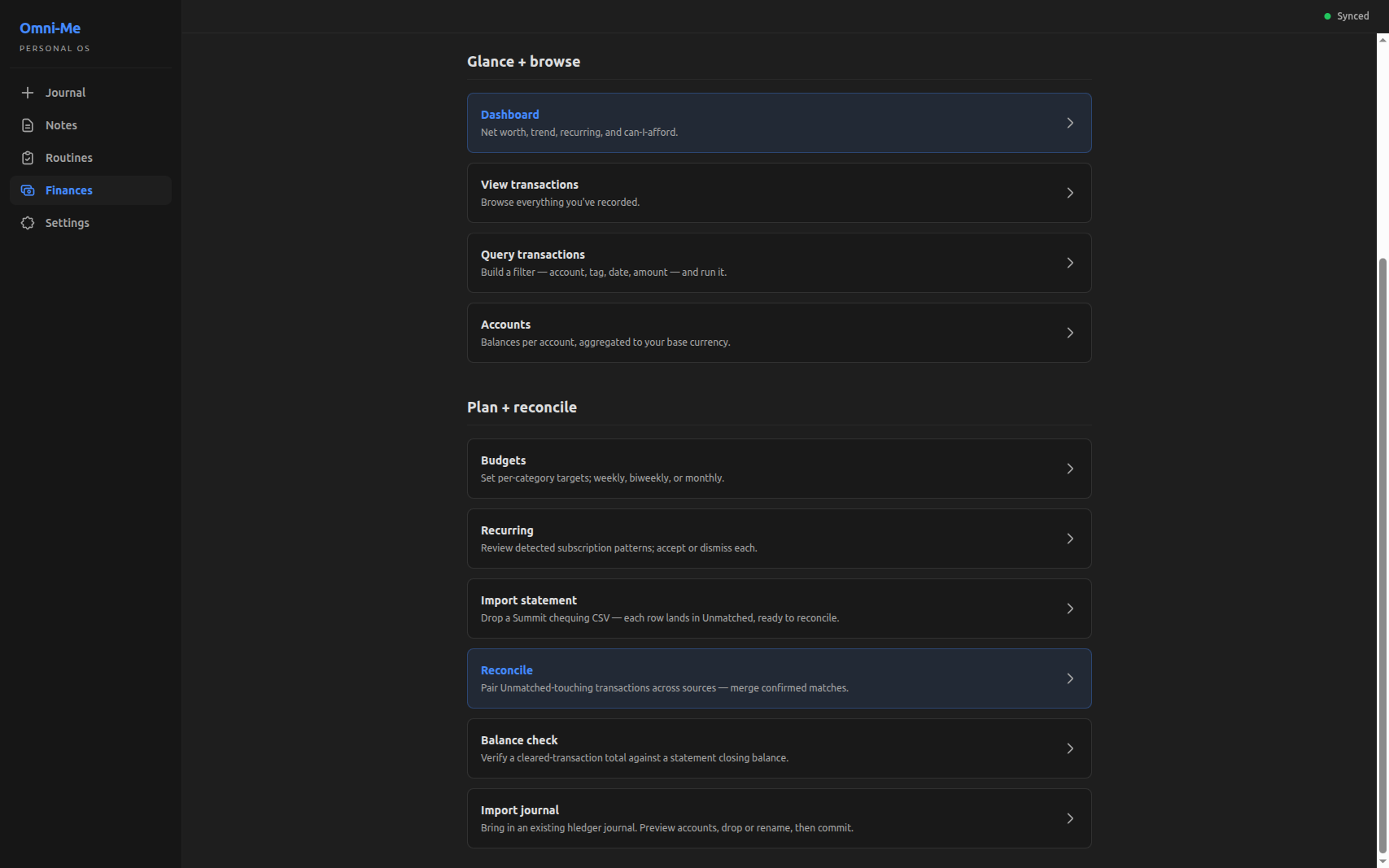
The screen's entry point lives in the Finances tab's Plan + reconcile section, alongside Recurring and Import statement:
Inside, the screen carries the add form at the top and one progress row per saved budget. Three rows here illustrate the three color bands the policy picks:
What's worth remembering or doing next?
- Cycle history isn't surfaced — once a cycle closes, the bar resets against the new window with no comparison back. The journal still carries the postings, so a "this month vs last month" view is buildable on top. Revisit when comparing across cycles becomes a real question.
- No notification when a budget tips into amber or over the line — the colored bar is the only signal, visible only when the screen is open. Revisit if missing-the-alert friction shows up in daily use.